
🎮 Mario Kart - Double Dash!!
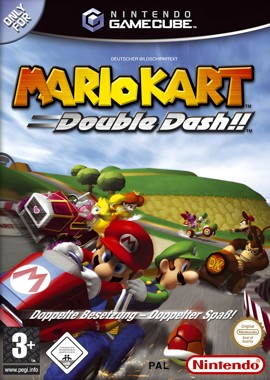
Mario Kart - Double Dash!!
Nintendo GameCube · Native play via Dolphin
1. Download KhoGameHub PC Launcher (once)
2. Run it (next → next → finish)
3. Click Play on PC — game launches automatically
4. Requires Dolphin Emulator to be installed


Open Related Rooms
Finding any related Room...
Description
Mario Kart: Double Dash!! brings the classic Kart racing experience to the GameCube with a unique twist: team up with a partner in your kart! Choose from an array of beloved Nintendo characters, each with their own special items, and race on a variety of imaginative tracks. Master drifting, utilize item strategies, and enjoy chaotic multiplayer fun that makes every race a thrilling challenge. With vibrant graphics, dynamic course designs, and an engaging two-player mechanics, this title delivers a nostalgic yet fresh kart racing experience that fans will adore.
Tags: racing multiplayer local classic difficulty fast-paced arcade classic🟣 GameCube Play Guide
- Install KhoGameHub Launcher (once only) and Dolphin Emulator — then click Play on PC (Dolphin), the game opens automatically.
- Android: Install the KhoGameHub app → tap Open in App to play directly.
- Controls: Plug in a gamepad (Xbox/DualShock both work), Dolphin detects it automatically. Switch controller type using the toggle button on the page.
💾 Saving
Dolphin uses a virtual memory card, saving automatically per-game like a real GC. Save state: F1–F8 (save slot) / Shift+F1–F8 (load slot).
⚙️ Dolphin Settings
- Graphics → Backend: Select Vulkan (best) or Direct3D 12/11 if Vulkan fails.
- Internal Resolution: 2x Native (1080p) or 3x for 1440p/4K displays — much sharper than native GC.
- Anti-Aliasing: MSAA 2x or 4x to remove jagged edges.
- Anisotropic Filtering: 4x or 16x for smoother distant textures.
- Widescreen Hack: Graphics → Enhancements → Widescreen Hack → enable for 16:9 (some games may show artifacts).
- Shader Compilation: First run may stutter — this is normal, Dolphin is building a shader cache. Subsequent runs will be smooth.
🎮 Controller Setup
Controllers → Port 1 → Standard Controller → Configure. For DualShock/DualSense: enable SDL as backend for full button support. Analog triggers (L/R) need correct axis mapping.
🖥️ Hardware Requirements — Dolphin
⚠️ Dolphin is the heaviest emulator of the four — GC/Wii uses high-speed PowerPC CPU, requiring strong IPC. More cores help less than high single-thread clock speed.
| Component | ⚠️ Minimum (1x native) | ✅ Recommended (2x–3x upscale) |
|---|---|---|
| 🪟 Windows / 🐧 Linux | ||
| CPU | Any 64-bit x86-64 / AArch64 (4+ cores) | 4+ cores · higher clock speed = better |
| RAM | 2 GB | 4 GB+ |
| GPU | Direct3D 11.1 / OpenGL 4.4 / Vulkan 1.1 (onboard OK) | Dedicated GPU · Vulkan 1.1 preferred |
| OS | Windows 10 1903 64-bit / Linux / macOS 11+ | Windows 10/11 64-bit (latest) / Ubuntu 22.04+ |
| 🤖 Android | ||
| SoC | 64-bit AArch64 · Android 5.0+ · OpenGL ES 3.0+ | Snapdragon 700+ · Android 9+ · Vulkan 1.1 |
| RAM | 3 GB · Android 5.0+ | 4-6 GB · Android 9+ |
* Dolphin is significantly heavier than PCSX2. Games like F-Zero GX and Metroid Prime demand strong CPUs. First-run shader stuttering is normal — smooth after cache is built.


Comments(0)