
🎮 Tsugunai - Atonement
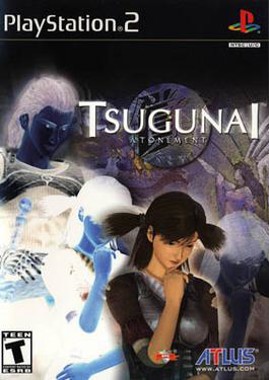
Tsugunai - Atonement
PlayStation 2 · Native play via PCSX2
1. Download KhoGameHub PC Launcher (once)
2. Run it (next → next → finish)
3. Click Play on PC — game launches automatically
4. PCSX2 downloads automatically on first launch


Open Related Rooms
Finding any related Room...
Description
Tsugunai - Atonement is a unique adventure RPG that intertwines fate and choices in a richly woven story. Players take on the role of a character who must journey through a mystical world to atone for a tragic past. Engage in turn-based combat, solve puzzles, and interact with a variety of memorable characters as you navigate this emotionally charged narrative. Featuring a blend of fantasy elements and deep storytelling, Tsugunai invites players to explore the impact of their decisions on the lives of others, all while delivering a captivating and immersive gameplay experience.
Tags: action adventure puzzle single player classic difficulty🔵 PS2 Play Guide
- Install KhoGameHub Launcher (once only) — PCSX2 will be downloaded automatically on first play. Click Play on PC (PCSX2), the game opens automatically.
- Android: Install the KhoGameHub app → tap Open in App to play directly.
- Controls: Plug in a gamepad (Xbox/DualShock both work). Switch controller type using the toggle button on the page.
💾 Saving
PCSX2 uses a virtual memory card — save in-game like a real PS2. Save state: F1 (save) / F3 (load).
⚙️ PCSX2 Settings
- Graphics → Renderer: Select Vulkan (best) or Direct3D 12/11 if Vulkan fails.
- Internal Resolution: 2x Native (1440p) or 3x/4x on powerful hardware — sharp image, eliminates PS2's blocky pixels.
- Texture Filtering: Bilinear (forced) for smoother textures.
- Anisotropic Filtering: 8x or 16x for clearer distant scenery.
- Widescreen Patches: Settings → Patches → enable Widescreen if available (not all games support it).
- Speedhacks: Settings → Emulation → EE Cycle Rate: -1 or -2 if games run slowly on weak hardware.
- BIOS: The Launcher installs BIOS automatically on first run — no extra steps needed.
🎮 Controller Setup
Settings → Controllers → Port 1 → DualShock 2 → Configure. DualShock/DualSense works via USB or Bluetooth. Analog mode: press the center LED button to activate sticks.
💿 Multi-disc Games
The game starts from disc 1. To switch discs: in PCSX2 → System → Change Disc → select the disc2.chd file in the cache folder.
🖥️ Hardware Requirements — PCSX2 Qt (modern build)
✅ PCSX2 Qt build (1.7+) is very lightweight and well-optimized — mid-range laptops from 2016+ can run most PS2 games at native resolution.
| Component | ⚠️ Minimum (native res) | ✅ Recommended (2x–4x upscale) |
|---|---|---|
| 🪟 Windows / 🐧 Linux | ||
| CPU | Dual-core 2.4 GHz with SSE2 (i3-3xxx / FX-4xxx) | i5-6400 / Ryzen 5 1600 · 3.2 GHz+ |
| RAM | 2 GB | 4 GB DDR4 |
| GPU | Intel HD 4000 / any GPU with OpenGL 3.0 / DX10 | GTX 1060 / RX 580 (Vulkan) — for 3x–4x upscaling |
| Storage | HDD | SSD — faster CHD decode on first game load |
| OS | Windows 8.1 64-bit / Ubuntu 18.04 | Windows 10/11 64-bit / Ubuntu 22.04+ |
| 🤖 Android (AetherSX2 / NetherSX2) | ||
| SoC | Snapdragon 600+ / mediatek p70 (native res) | Snapdragon 845 / Dimensity 820+ (2x upscale) |
| RAM | 3 GB · Android 8.0+ | 4 GB · Android 10+ |
* Heavy games like God of War 2, Shadow of the Colossus need ~3.0 GHz+ single-thread CPU for 60fps. 2D/simple games run well even on minimum spec.









Comments(0)